
Implementation Details
In the sections below, we provide detailed information for each of the components of Solution Builder. That includes items like Installer, Webpage, Basic Uploader, BasicUploadSkin-x.y.z.jar, Launcher URL Protocol, and ScreenPal application.
Installer Support
Section titled “Installer Support”The ScreenPal Installers for Solution Builder are modified versions of the standard ScreenPal Installers. They run silently with no need for Customer interaction, except to dismiss a message at the end instructing them to go back to the Client’s webpage to continue.
These Installers are provided by ScreenPal and the Client’s webpage, using the ScreenPal supplied Basic Uploader JavaScript, provides download links to them.
Besides installing the ScreenPal application, the Installers also register with the operating system a custom URL protocol, such as screen-recorder-launcher-jre19://ScreenRecorder?....
When a browser on the operating system tries to open a URL that begins with that prefix the operating system will run the ScreenPal application and pass it the URL for ScreenPal to process. ScreenPal extracts Client information and customizations from the URL and launches ScreenPal application with them.
Webpage Support
Section titled “Webpage Support”The Solution Builder feature starts with the Client’s webpage. Clients install and customize the ScreenPal provided JavaScript code, referred to as the “Basic Uploader”, on their website.
The Basic Uploader allows the Client to set their customizations for detecting if ScreenPal is installed, setting the language and content of the messages displayed for status and errors, and launches ScreenPal with specified options.
The Basic Uploader allows the JavaScript to be altered to provide the Client pre-ScreenPal-launch customizations. The Client customizations that apply to the ScreenPal launching are provided through the ScreenPal Launcher URL Protocol specification. Additional Client customizations that apply during ScreenPal execution are provided in a specified special downloaded JAR file.
The Launcher URL Protocol allows specifying which version of installed Solution Builder ScreenPal to launch, and passes it the desired list of JARs that define the downloadable updated version of ScreenPal, options to customize the video uploading experience, and the special JAR, “BasicUploadSkin-x.y.z.jar”, which supplies the Client’s customized “appDisplay.properties” that defines Client customizations for ScreenPal runtime.
Basic Uploader
Section titled “Basic Uploader”The Basic Uploader is the ScreenPal provided JavaScript that Clients install on their webpage and then customize. It allows detecting that ScreenPal needs to be installed and offering a ScreenPal Solution Builder Installer to download and run. Then the JavaScript allows launching ScreenPal with provided options and customization.
Messages can be displayed for status and error, and can be customized by the Client, including the locale language. For example, an attempt to launch ScreenPal may time out and a failure message is then displayed on the webpage. That can be a simple timeout value in the script, or an alternative method where the Client’s backend is sent updates and polling status.
Clients may view the source code of the Basic Uploader by using the webbrowser’s “view source” feature at https://screenpal.com/api/example/basicuploader-JRE19.
The JavaScript includes these “basicupload.xxx” property customizations. Additionally, there is a “SOMLauncher” JavaScript Object that provides interfaces to these same customizations.
- Customize display, status, and error messages.
- Specify the versions of Mac and Windows ScreenPal Solution Builder Installers that are offered for download.
- Detect if ScreenPal is already installed.
- Set the Partner ID, site, and key.
- Specify where the JARs are downloaded from.
- Specify which JARs are passed to ScreenPal when it launches. This established the “forced version” of ScreenPal APP as well as provides the Client’s customizations in the “BasicUploadSkin-x.y.z.jar”.
- Specify Client’s API URL callbacks for interactive video uploads to ScreenPal or the Client’s servers.
- Specify URL to open on success.
- Resize video to specified max width when they are too large.
- Upload directly to Amazon S3 storage.
- Show or hide optional UI components in ScreenPal Upload UI.
- Allow or disallow UI navigation to Editor or Manager.
- Set the locale. (Which language to use.)
Launcher URL Protocol
Section titled “Launcher URL Protocol”The Basic Uploader JavaScript launches ScreenPal by using a ScreenPal custom URL protocol. For example, screen-recorder-launcher-jre19://ScreenRecorder?....
Here is an example:
screen-recorder-launcher-jre19://ScreenRecorder/?p=MyDomain,mydomain.com,XXwXFHKE%2FQiaVptNIJwb6sPA8YpXwnZdAhRU%2B7idw5pMb8%2BxDoT%2BBZGiWNqHbg%3D%3D,1738281601&jh=https%3A%2F%2Ffiles3.screenpal.com%2Fjars&jl=BasicUploadSkin1.0.6.jar,ScreencastOMaticEditor-3.8.2.jar,AppSkin-3.8.2.jar,RecorderSkin-3.8.2.jar,AppNative-3.8.2.jar,libresample4j-2016.jar,jl1.0.1-2017.jar,batik-all-1.16.jar,xml-apis-1.4.01.jar,xml-apis-ext-1.3.04.jar,xmlgraphics-commons-2.7.jar&rl=1704639171603&al=true&som.*.encoder.url=https%3A%2F%2Ffiles3.screenpal.com%2Fjars%2Fsom-com-OS-encoder-v4.3.1.zip&som.*.encoder.name=som_com_encoder_4_3_1&basicupload.site.name=My%20Domain&basicupload.request.url=http%3A%2F%2Fmydomain.com%2Ftest%2FbasicuploadS3Upload.php%3Fid%3Dmyid&basicupload.success.url=http%3A%2F%2Fmydomain.com%2Ftest%2FbasicuploadSuccess.php%3Fid%3Dmyid&basicupload.post.maxwidth=1280&basicupload.post.method=PUT&basicupload.post.extraheaders.1=x-amz-acl%3Apublic-read&basicupload.panel.message=Click%20Upload&basicupload.panel.input.title.show=true&basicupload.panel.input.description.show=true&basicupload.offer.savevideo=false&locale=en&browser=chromeHere is that same example but broken down by URL parameters for easier viewing. Note that it supplies this particular Client’s customized “appDisplay.properties” inside their “BasicUploadSkin-1.0.6.jar” JAR.
screen-recorder-launcher-jre19://ScreenRecorder/?p=MyDomain, mydomain.com, XXwXFHKE%2FQiaVptNIJwb6sPA8YpXwnZdAhRU%2B7idw5pMb8%2BxDoT%2BBZGiWNqHbg%3D%3D, 1738281601&jh=https%3A%2F%2Ffiles3.screenpal.com%2Fjars&jl= BasicUploadSkin1.0.6.jar, ScreencastOMaticEditor-3.8.2.jar, AppSkin-3.8.2.jar, RecorderSkin-3.8.2.jar, AppNative-3.8.2.jar, libresample4j-2016.jar, jl1.0.1-2017.jar, batik-all-1.16.jar, xml-apis-1.4.01.jar, xml-apis-ext-1.3.04.jar, xmlgraphics-commons-2.7.jar&rl=1704639171603&al=true&som.*.encoder.url=https%3A%2F%2Ffiles3.screenpal.com%2Fjars%2Fsom-com-OS-encoder-v4.3.1.zip&som.*.encoder.name=som_com_encoder_4_3_1&basicupload.site.name=My%20Domain&basicupload.request.url=http%3A%2F%2Fmydomain.com%2Ftest%2FbasicuploadS3Upload.php%3Fid%3Dmyid&basicupload.success.url=http%3A%2F%2Fmydomain.com%2Ftest%2FbasicuploadSuccess.php%3Fid%3Dmyid&basicupload.post.maxwidth=1280&basicupload.post.method=PUT&basicupload.post.extraheaders.1=x-amz-acl%3Apublic-read&basicupload.panel.message=Click%20Upload&basicupload.panel.input.title.show=true&basicupload.panel.input.description.show=true&basicupload.offer.savevideo=false&locale=en&browser=chromeHere, we extract the JARs from the example above to show what was sent for this Solution Builder Client:
ScreencastOMaticEditor-3.8.2.jarAppSkin-3.8.2.jarRecorderSkin-3.8.2.jarAppNative-3.8.2.jarlibresample4j-2016.jarjl1.0.1-2017.jarbatik-all-1.16.jarxml-apis-1.4.01.jarxml-apis-ext-1.3.04.jarxmlgraphics-commons-2.7.jarBasicUploadSkin1.0.6.jarHere, we extract the “appDisplay.properties” override properties passed down in the Launch URL:
&som.*.encoder.url=https%3A%2F%2Ffiles3.screenpal.com%2Fjars%2Fsom-com-OS-encoder-v4.3.1.zip&som.*.encoder.name=som_com_encoder_4_3_1&basicupload.site.name=My%20Domain&basicupload.request.url=http%3A%2F%2Fmydomain.com%2Ftest%2FbasicuploadS3Upload.php%3Fid%3Dmyid&basicupload.success.url=http%3A%2F%2Fmydomain.com%2Ftest%2FbasicuploadSuccess.php%3Fid%3Dmyid&basicupload.post.maxwidth=1280&basicupload.post.method=PUT&basicupload.post.extraheaders.1=x-amz-acl%3Apublic-read&basicupload.panel.message=Click%20Upload&basicupload.panel.input.title.show=true&basicupload.panel.input.description.show=true&basicupload.offer.savevideo=falseBasicUploadSkin-x.y.z.jar
Section titled “BasicUploadSkin-x.y.z.jar”ScreenPal uses Java properties files, text files with “key=value” entries, to specify options and customizations at ScreenPal runtime. The “appDisplay.properties” file is the one that is for ScreenPal APP. It is delivered via a JAR file, “SOMAppSkin-x.y.z.jar”, such as “SOMAppSkin-3.8.2.jar”.
Solution Builder Clients replace that with their own, so their customizations and options are used instead. It is still the “appDisplay.properties” file, but it has content customized by the Client. It is delivered via a JAR file “BasicUploadSkin-x.y.z.jar”, such as “BasicUploadSkin-1.0.6.jar”.
Notice in the Launcher URL Protocol section that ScreenPal is passed JARs, but instead of passing “SOMAppSkin-x.y.z.jar”, the Client’s “BasicUploadSkin-x.y.z.jar” is passed.
The properties in “appDisplay.properties”, such as “basicupload.xxx=???” and “som.*.xxx=???” are allowed to be altered by the Client. These changes allow for features such as:
- Conditionally perform ScreenPal actions.
- Enable/disable ScreenPal features.
- Show/hide ScreenPal UI.
- Customize ScreenPal UI components.
For example, customize how the Upload UI panel looks like, which buttons it shows, specify the displayed text, allow/disallow navigating to the Editor/Manager, and etc.
ScreenPal Support
Section titled “ScreenPal Support”The ScreenPal APP (including Recorder, Editor, Manager, etc.) support Solution Builder Clients by allowing them to choose options and customize some features and functionality. These Client choices are specified in the “appDisplay.properties” text file that is stored inside the “BasicUploadSkin-x.y.z.jar” JAR file, and passed to ScreenPal via the Launcher URL Protocol.
During runtime, ScreenPal will read the Client’s customized properties and respond accordingly. For example, ScreenPal shows the Upload UI with their options and customizations.
Custom Uploader
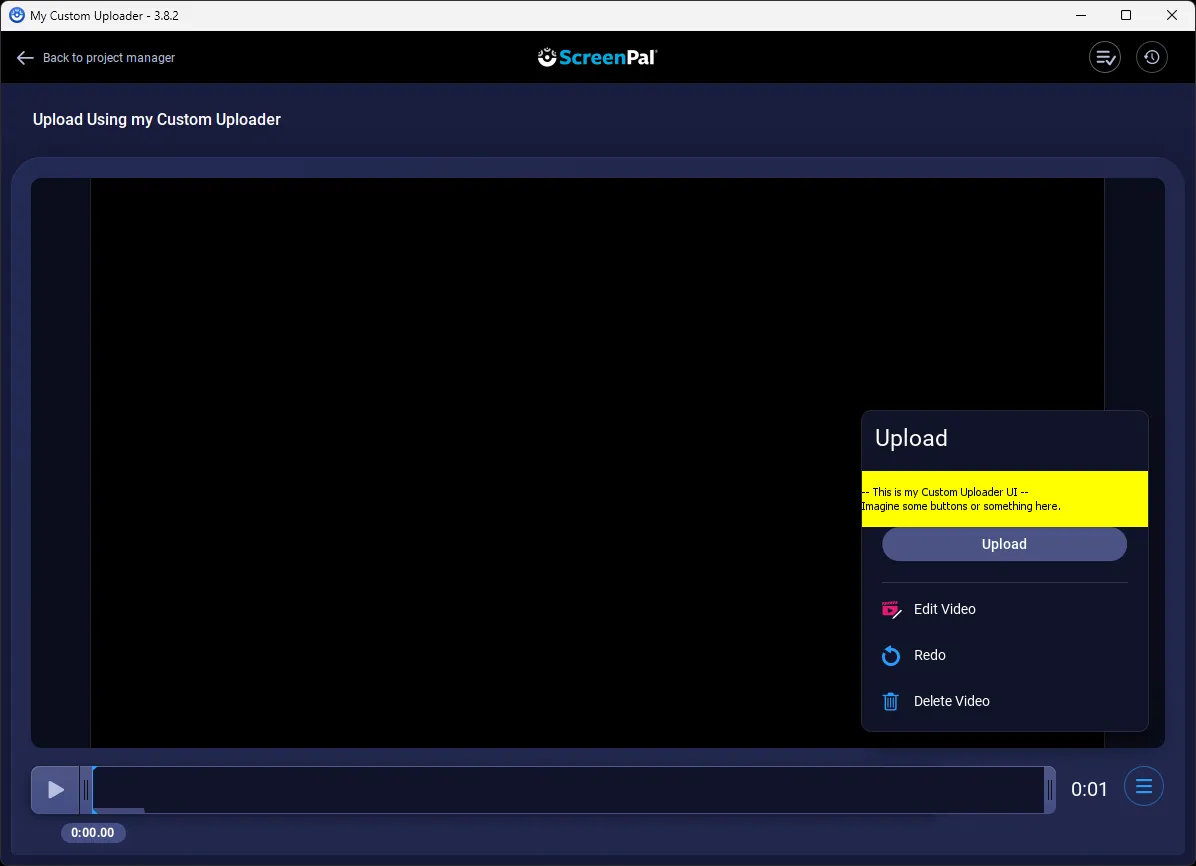
Section titled “Custom Uploader”A Solution Builder Client may also supply a “Custom Uploader”, which is customized Java UI in a reserved section of the ScreenPal Upload UI panel. For more information, see Configure the Custom Uploader.
Here is a screeshot that shows the area where your custom Java (not JavaScript) code implementation would appear.
If you are interested in creating a Custom Uploader, please Contact Sales with your request for “Creating my own Solution Builder Custom Uploader”.
For More Information
Section titled “For More Information”Also see